Market Terminal
Credit Rating Announcements: How to Read Them on Unfluke
8 min read · Updated 2 Nov 2026
The Credit Ratings page lists rating-related announcements that companies have filed with the exchange, filterable by rating agency, time window and company, with a link to each filed document.
This guide explains how the page works, its limits, and how rating news is usually interpreted.
What is a credit rating announcement?
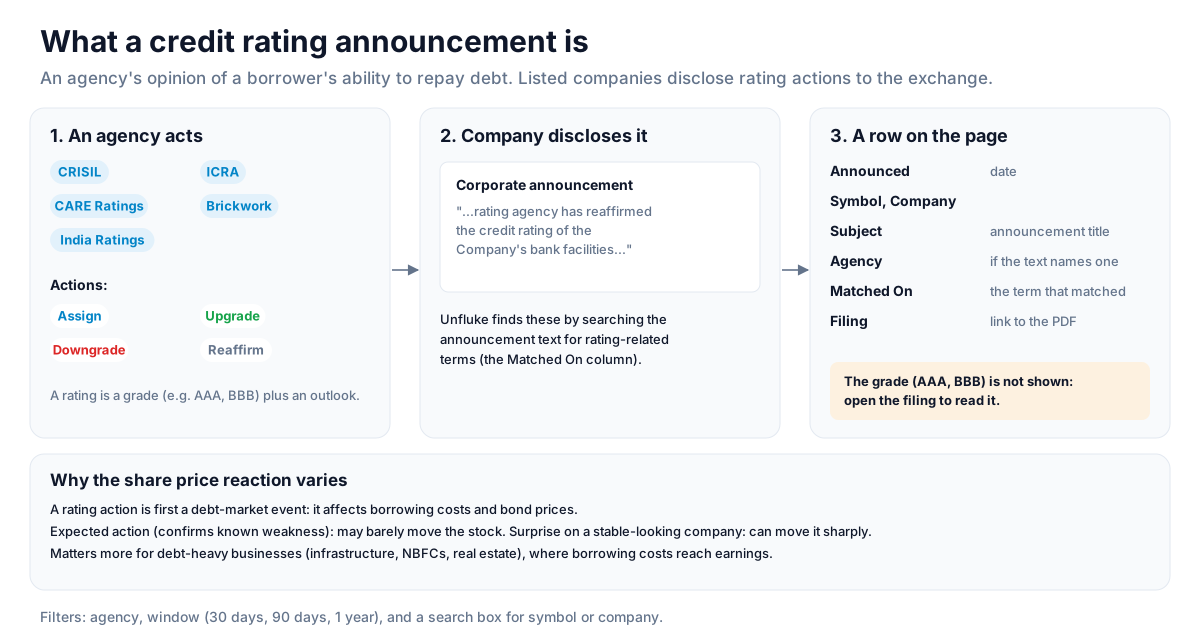
A credit rating is an agency's opinion of a borrower's ability to repay debt. When an agency such as CRISIL, ICRA, CARE Ratings, Brickwork or India Ratings assigns, upgrades, downgrades or reaffirms a rating, listed companies disclose it to the exchange.
Unfluke finds these by searching the text of corporate announcements for rating-related terms. The page does not show the rating grade itself (such as AAA or BBB); open the filed document to read the rating, outlook and rationale.
How to read it
- Agency filter - All agencies, or one named agency. Only announcements whose text names the agency can be filtered this way.
- Window - 30 days, 90 days or 1 year; the date picker sets the end date.
- Search box - filter by symbol or company name.
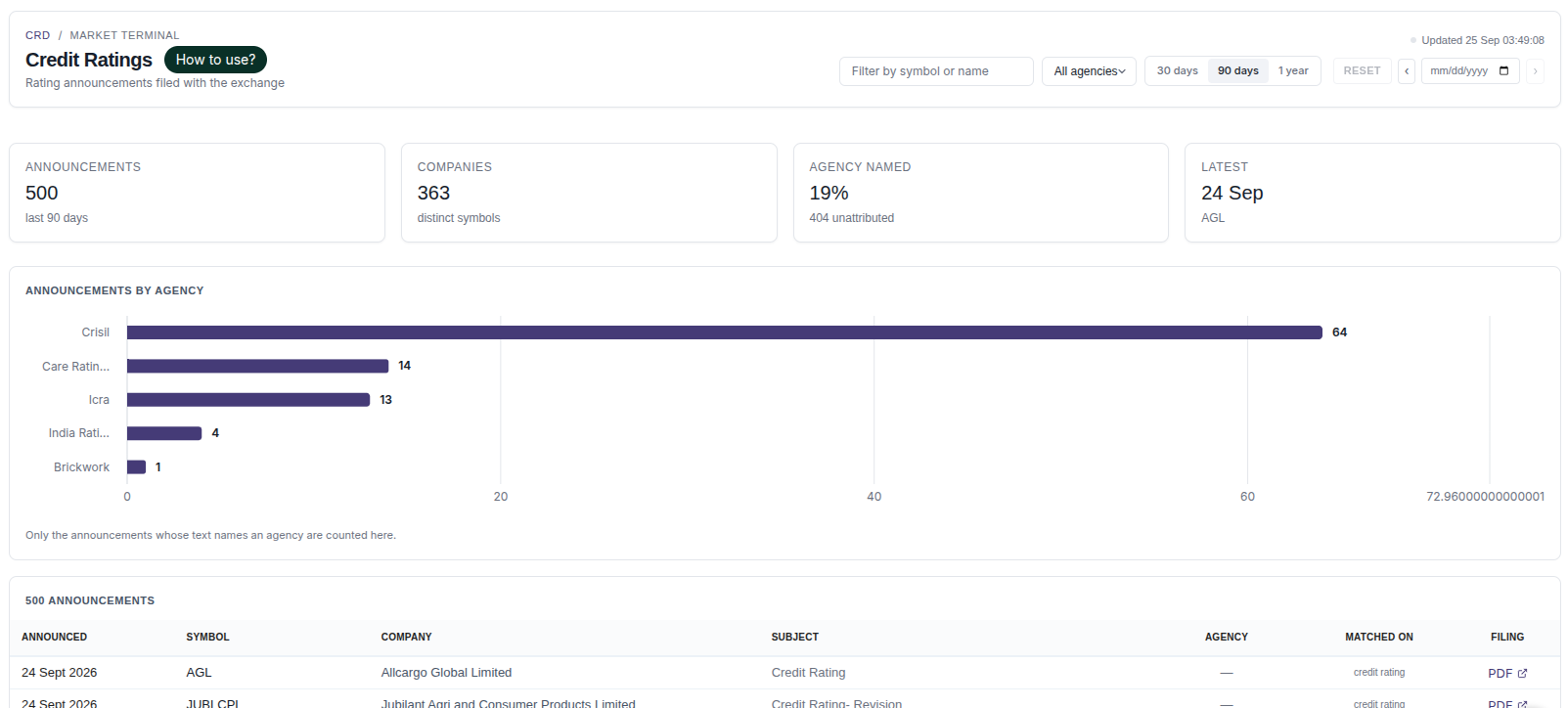
- Announcements, Companies, Agency Named, Latest - totals for the window, distinct companies, how many announcements name an agency (the rest are unattributed), and the most recent one.
- Announcements by agency chart - counts for announcements that name an agency.
- Table - Announced, Symbol, Company, Subject, Agency, Matched On (the term that identified it as rating news) and Filing (a link to the PDF on nseindia.com).
Using the page for research
- Search for a company to see its recent rating announcements.
- Open the filing to read the actual rating action and outlook.
- Check whether several agencies have acted on the same company around the same time.
- Use the 1-year window to see how often a company's ratings are reviewed.
Why the share price reaction varies
A rating action is first a debt-market event - it affects borrowing costs and bond prices. Its effect on the share price depends on how much the market had already expected. A downgrade that confirms known weakness may barely move the stock; a surprise action on a company that looked stable can move it sharply. Rating news tends to matter more for debt-heavy businesses such as infrastructure, NBFCs and real estate, where borrowing costs flow through to earnings.
Strategy ideas (ideas, not promises)
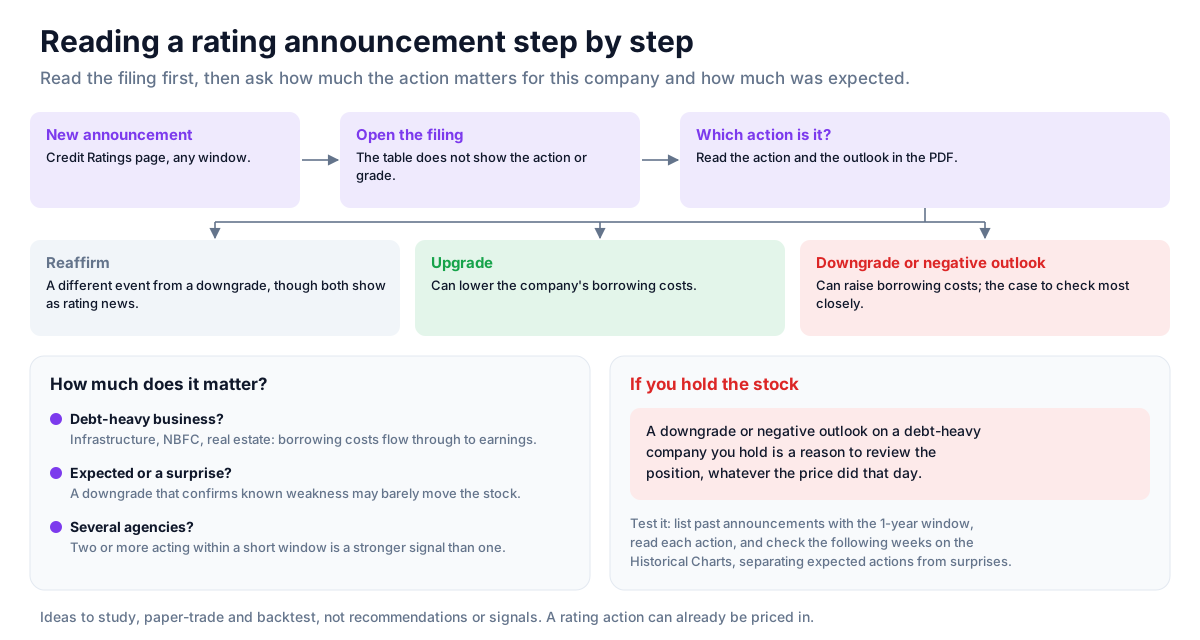
These are ideas to study, paper-trade and backtest, not recommendations or signals, and not a promise of any result. A rating action can be expected and already priced in. Size, entries, exits and risk are your own decisions.
1. Read the filing before reacting
- Setup: a new announcement on the Credit Ratings page.
- Reading: open the filed document for the action and the outlook; the table does not show the grade itself.
- Use: a reaffirmation is a different event from a downgrade, even if both appear as rating news.
2. Focus on debt-heavy businesses
- Setup: rating news for infrastructure, NBFC or real-estate companies.
- Reading: borrowing costs flow through to earnings in these businesses, so rating actions matter more there.
3. Look for actions from several agencies
- Setup: two or more agencies acting on the same company within a short window.
- Reading: agreement between agencies is a stronger signal than a single action.
4. Avoid holding through a known stress
- Invalidation: a downgrade or negative outlook on a debt-heavy company you hold is a reason to review the position, whatever the price did that day.
How to test these
Use the 1-year window to list past rating announcements, read each action in its filing, and check on the Historical Charts how the stock moved in the following weeks, separating expected actions from surprises.
Where to go next
Return to the reference data guide. Try the Credit Ratings page free.
How to Read This Data
Credit ratings are opinions from rating agencies on a company's ability to repay its debt. Rating actions — upgrades, downgrades, outlook changes — are filed with the exchange and help explain changes in how lenders view a company.
- Compare the new rating and outlook with the previous one to see the direction of the change.
- Note which instrument was rated; a company can have different ratings for different debt.
- Read the agency's rationale for the factors behind the action.
- Look at the sequence of actions over time rather than a single announcement.
Limitations: A rating is an agency's opinion, not a guarantee. Ratings can lag events, and the market may already reflect the information when the action is announced.
More from the blog
- Strategy Backtesting on Unfluke
Backtest trading strategies on real Indian market data with Unfluke. Test equity, Nifty, Bank Nifty and options strategies with realistic costs and key metrics.
- Live Market Scanners
Explore Unfluke's real-time stock scanner for NSE markets. Scan 1,800+ stocks with 40+ technical indicators, fundamental filters, F&O data and custom rules.
- Option Strategy Simulator
Build and simulate multi-leg options strategies with Unfluke. Visualize payoffs, Greeks, max profit and loss, and replay historical option data from 2023.