Product
Live Market Scanners
11 min read · Updated 2 Nov 2026
NSE has roughly 1,800 listed equities, plus a deep F&O segment, plus four major indices and dozens of sectoral indices. Reading every chart, every day, by hand is not serious trading - it's an exercise in eye strain. A scanner is how Indian traders compress that universe down to the names worth thinking about today.
Unfluke's scanner is built for the trader who wants depth without friction - 40+ technical indicators, full fundamental ratio coverage, an expression builder for compound logic, multi-timeframe support, saved scans, and native alert integration. This piece walks through what it does and how to use it without drowning in noise.
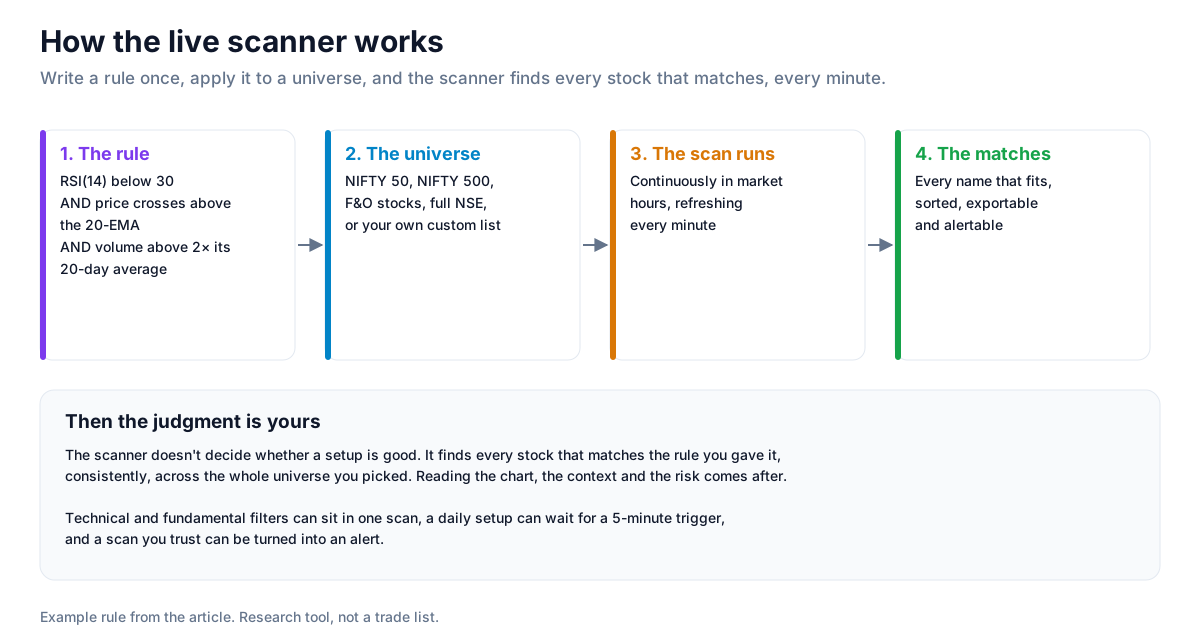
How the scanner works
Build a condition like "RSI(14) < 30 AND price crosses above 20-EMA AND volume > 2x 20-day average". Apply it to a universe (NIFTY 50, NIFTY 500, F&O, full NSE, or your own custom list). The scanner runs continuously, refreshes every minute during market hours, and surfaces every name that matches - sorted, exportable, alertable.
The scanner itself doesn't decide whether the setup is good - that's your job. It finds every stock that matches the rule you gave it, consistently, every time, across the full universe you selected. The judgment work happens after.
40+ technical indicators
The scanner ships with the full standard library plus a few specialised additions:
- Momentum: RSI, stochastic, MACD, ROC, MFI
- Trend: EMAs (any length), SMAs, Hull MA, supertrend, ADX, DMI
- Volatility: Bollinger Bands, ATR, Keltner Channels, standard deviation bands
- Volume: OBV, VWAP, A/D line, volume MA, relative volume
- Price action: highest/lowest of N periods, crossovers, gap detection
- Custom expressions: any indicator combined with AND/OR/NOT logic, with lookback references
Technical & fundamental in one place
Most retail scanners are technicals-only or fundamentals-only, forcing you to bounce between tools. Unfluke's scanner lets you stack both in a single rule: "P/E < 25 AND ROE > 18% AND RSI(14) crosses above 60 today". The fundamental side covers P/E, P/B, ROE, ROCE, market cap, debt-to-equity, dividend yield, profit growth, and sales growth across the full NSE universe. That intersection - fundamentally sound names with technically primed setups - is where most of the best swing-trade opportunities live.
Multi-timeframe - daily setup, 5-min trigger
Real setups span timeframes. "RSI > 60 on daily AND close > VWAP on 5-min" is a typical intraday trader rule. If your scanner only operates on one timeframe at a time, you can't express this. Unfluke's expression builder lets you reference multiple timeframes in a single rule, so you can layer a daily setup with an intraday trigger without duct-taping two scans together.
The expression builder - beyond dropdowns
Dropdown-based rule builders cover the first 90% of setups. For the last 10% - nested AND/OR logic, lookback references like "high of last 5 days", relative comparisons across timeframes - you need an expression builder. Unfluke's expression builder lets you write compound logic without leaving the UI: combine indicators, reference history, mix timeframes, set ratio comparisons. No code; full expressive power.
Turn a scan into an alert
A scan that doesn't alert you is just a database query. Any saved scan can be turned into a recurring alert with one click. Deliveries go to email, in-app notifications, Telegram, and WhatsApp - pick any combination. The alert fires the moment a stock matches your criteria, so you don't sit refreshing the scanner page. Tier-gated quotas apply on paid plans; the Free tier includes a workable alert quota for casual use.
F&O-specific filters
Beyond standard technicals, the scanner supports F&O-specific filters: open interest build-up, OI change, IV percentile, max pain, put-call ratio. Useful for short-premium traders identifying high-IV opportunities, or futures traders watching for positioning shifts. Combine with segment filtering (equities, indices, F&O, options) for targeted F&O scanning.
Saved scans and workflow
The point of a scanner isn't running it once. The point is building a library of trusted scans, running them on schedule, and getting alerted when they fire. Save scans to your workspace, name them, tag them, share with the community, or export results to CSV for offline review. Without saved scans and alerts, you'd be doing manual setup every session - a scanner that forgets your work isn't built for serious use.
Common scanning mistakes
- Over-filtering. 8 conditions stacked = your scan matches 1 stock a year. Useless.
- Under-filtering. 1 condition = 200 matches a day. Indistinguishable from noise.
- Skipping volume confirmation. Indicator-only filters fire on illiquid names where you can't trade size.
- Buying every match. The scanner gives you candidates, not signals. Manual review on top is non-negotiable.
- Writing rules for what you already believe. Configuring filters that conveniently match the stocks you already like. Reverse the test - would your scan have found a winner you didn't already know?
Strategy ideas (ideas, not promises)
These are ideas to study, paper-trade and backtest, not recommendations or signals, and not a promise of any result. A scan finds stocks that match a rule; it does not tell you the setup will work. Size, entries, exits and risk are your own decisions.
1. Pair a fundamental filter with a technical trigger
- Setup: a rule such as P/E below 25 AND ROE above 18% AND RSI(14) crossing above 60 today.
- Use: a shortlist of sound businesses whose charts are moving, to study by hand.
2. Daily setup, intraday trigger
- Setup: RSI above 60 on the daily chart AND close above VWAP on the 5-minute chart, in one multi-timeframe rule.
- Use: only names already strong on the daily chart reach your intraday list.
3. Turn a scan you trust into an alert
- Setup: save a scan, then switch it to an alert on Telegram or in-app.
- Use: you hear about matches when they happen instead of rerunning the scan.
4. Check how often a scan has fired
- Setup: before relying on a scan, export what it finds and backtest the same rule.
- Invalidation: a scan that rarely fires, or whose matches did no better than the index, is not worth an alert.
How to test these
Save the scan, export its matches over a few weeks, and backtest the same rule on Unfluke to see how its matches behaved.
Honest caveats
A scanner is research infrastructure, not a signal generator. Every stock it returns is a candidate for further work - chart inspection, fundamental check, position sizing. Trading every scanner hit is the fastest way to discover that real edge lives in which candidates you act on, not in how many you find.
Where to go next
For a buyer's-checklist view of what scanners should do, see Top 10 Features Every Stock Scanner Should Have. For the scanner-vs-manual debate, see Stock Scanner vs Manual Analysis. Or just sign up free and run your first scan in under a minute.
More from the blog
- Strategy Backtesting on Unfluke
Backtest trading strategies on real Indian market data with Unfluke. Test equity, Nifty, Bank Nifty and options strategies with realistic costs and key metrics.
- Option Strategy Simulator
Build and simulate multi-leg options strategies with Unfluke. Visualize payoffs, Greeks, max profit and loss, and replay historical option data from 2023.
- Unfluke AI - Your Trading Assistant
Use Unfluke AI as your trading assistant for stock research, scanners, strategy building and backtesting. Ask questions in plain English using Indian market data.