Product
Real-Time Alerts
10 min read · Updated 2 Nov 2026
Setups don't wait for you to check your phone. The trader who spots a clean breakout 20 minutes late has missed most of the move. Manually watching scanners or charts for hours every day isn't a workflow - it's an attention tax. Alerts are how serious traders stay informed without staying glued to a screen.
Unfluke's alert system watches the market continuously and pings you the instant a condition fires, on whichever channel you actually pay attention to. This piece covers the alert types, delivery channels, integration with scanner and backtester, and the discipline pitfalls that turn useful alerts into noise.
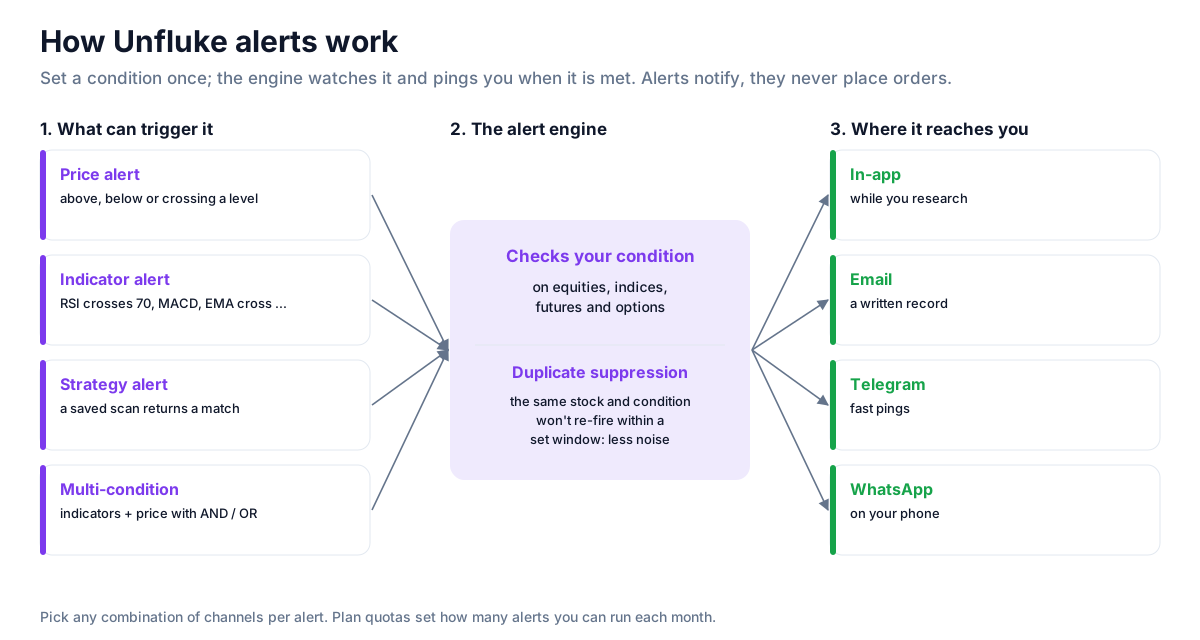
Types of alerts
- Price alerts - above / below / cross a threshold. The simplest and still the most useful.
- Indicator alerts - RSI crosses 70, MACD histogram positive, EMA cross, Bollinger touch, supertrend flip. Configure the indicator parameters per alert.
- Strategy alerts - fire when a saved scanner returns a hit. Effectively: "alert me when the scanner finds anything matching this setup".
- Multi-condition alerts - combine indicators and price action with AND/OR logic. "RSI > 70 AND volume > 2x avg" rather than two separate alerts.
- Cross-asset coverage - equities, indices, futures, options. The same alert engine across the universe.
- Fundamental alerts - beta. Notify on quarterly results, ratio changes, ratings shifts. Available on request.
Delivery channels
Pick any combination of in-app notifications, email, Telegram, and WhatsApp per alert. Each alert can deliver to multiple channels - useful for high-priority setups you can't afford to miss. The default mix most traders settle on: Telegram for speed (it pings fast and lets you screenshot to share), in-app for context (you'll be in the platform anyway when researching), email as fallback. Quota tiers apply per plan - paid tiers raise monthly alert volume.
Scanner → alerts in one click
The most powerful workflow is the scanner-alert combo. Build a scan in Unfluke's scanner, save it, then promote it to an alert with one click. From that point, whenever any stock matches your scan criteria, you get pinged instantly - no manual scan-running, no missed setups. Combined with multi-condition scanner rules, this is the closest thing retail traders have to an institutional desk alert system.
Duplicate suppression - quiet noise
An alert that fires 200 times on the same day is worse than no alert. Unfluke's engine has built-in duplicate suppression: an alert that just fired on the same stock for the same condition won't re-fire within a configurable window. This matters a lot for indicator alerts on volatile names - without suppression, an RSI alert on a chop day can produce dozens of pings of zero informational value.
Alert discipline - the rule of 5
The most common alert mistake is too many. A trader who configures 30 alerts ends up dismissing them all by week 2. The discipline that works:
- Maximum 5 active alerts at any time. If you want a new alert, retire an old one.
- Each alert maps to a specific tradeable rule. Not "interesting things". If you can't say what you'll do when this alert fires, you shouldn't have configured it.
- Review alerts monthly. Which ones produced actual trades? Which were ignored? Kill the dead ones.
An alert system without discipline becomes a notification firehose. With discipline, it's a research multiplier.
What alerts unlock - example workflows
- The "show me when it breaks" alert. Watch a specific stock's resistance level. Get pinged the moment it breaks above. You don't open the chart until the alert fires.
- The "wake me on a setup" alert. Saved scanner promoted to alert. Goes off only when your specific technical-plus-fundamental setup matches a stock.
- The "watch my position" alert. Price alert on a position you already hold - at your trailing stop level or target.
- The "macro context" alert. Nifty crosses key support / resistance. You don't need to watch Nifty; the alert tells you when to look.
- The "expiry-day reminder" alert. Bank Nifty crosses your defined-risk zone on weekly expiry. Critical for short-premium traders.
Alerts vs auto-execution - and why we don't auto-execute
Alerts notify; they don't execute. Unfluke is broker-agnostic and deliberately leaves the trade itself to your broker terminal. Auto-execution sounds powerful but historically creates more retail problems than it solves: bad orders during fast markets, fat-finger errors compounded by automation, and the discipline atrophy that comes from outsourcing decisions. Alerts at the moment of opportunity + you placing the order is the right balance for most retail traders.
Strategy ideas (ideas, not promises)
These are ideas to study, paper-trade and backtest, not recommendations or signals, and not a promise of any result. An alert tells you a condition was met; it does not place a trade or say the trade is good. Size, entries, exits and risk are your own decisions.
1. Alert on the setup, not the price
- Setup: instead of many price alerts, save one scan for your setup and turn it into a strategy alert.
- Use: one alert covers every stock that matches, across the whole universe you chose.
2. Combine conditions to cut noise
- Setup: a multi-condition alert such as RSI above 70 AND volume above 2x its average.
- Use: fewer, more meaningful pings than two separate single-condition alerts.
3. Keep the list short
- Setup: follow the rule of five from this article: a handful of alerts you act on, not dozens you ignore.
- Reading: an alert you have muted three times should be changed or deleted.
4. Review what your alerts caught
- Setup: once a month, list the alerts that fired and what price did afterwards.
- Use: keep the alerts whose hits were worth studying; rewrite the rest.
How to test these
Run the alert's condition as a scan on past dates, or backtest it, to see how often it fired and what followed.
Honest caveats
An alert is information, not a signal. The moment your alert fires is the moment you should start your analysis - chart inspection, position sizing, risk check - not the moment you should place an order. Most retail traders who lose money on alerts are reacting too fast, not too slow. Build a quick checklist of three questions you answer before placing a trade based on any alert.
Where to go next
The alert system pairs with the scanner. For setup ideas to alert on, see Top 10 Scanner Features. Sign up free to start configuring your first alert in under a minute.
More from the blog
- Strategy Backtesting on Unfluke
Backtest trading strategies on real Indian market data with Unfluke. Test equity, Nifty, Bank Nifty and options strategies with realistic costs and key metrics.
- Live Market Scanners
Explore Unfluke's real-time stock scanner for NSE markets. Scan 1,800+ stocks with 40+ technical indicators, fundamental filters, F&O data and custom rules.
- Option Strategy Simulator
Build and simulate multi-leg options strategies with Unfluke. Visualize payoffs, Greeks, max profit and loss, and replay historical option data from 2023.